download these two then setup paint studio right click one of the icons after its done and click “file location” copy the crack files into the main paint studio file then click on the crack.exe till it says ok open paint studio
While I have not found the information I am looking for yet, I did find this page which details the damage mechanics for Explorers of Time/Darkness/Sky and it is a very interesting read (if you’re like me and into this sort of thing, anyway).
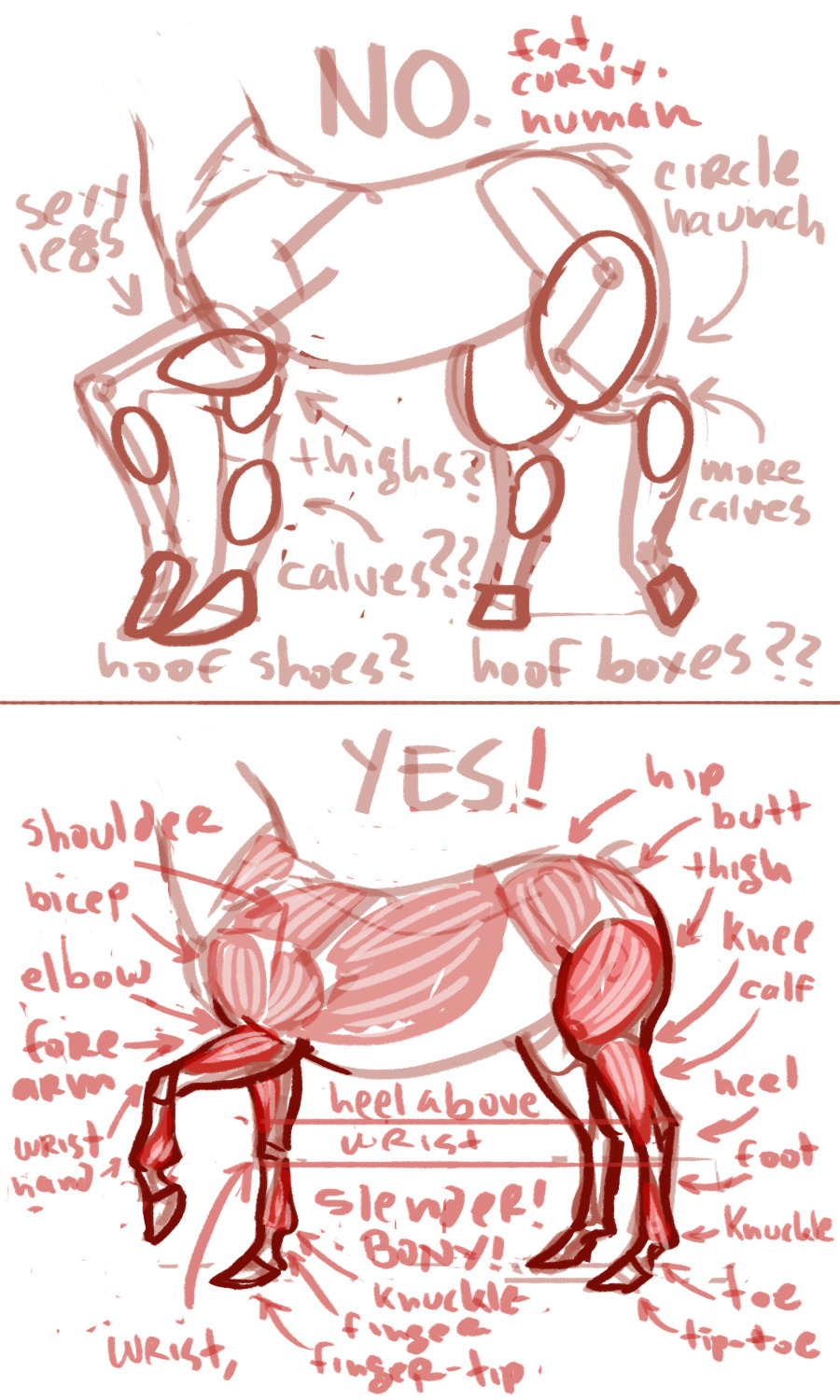
it absolutely drives me bonkers when people draw horses with shapely, sexy human lady legs, so here is a guide to drawing shapely, sexy horselady legs
it’s important to remember that even with centaurs the front legs of a horse are muscled like forelegs, and correspond to human arms, and that all the legs are much thinner than bonier than you’d expect after looking at human limbs.
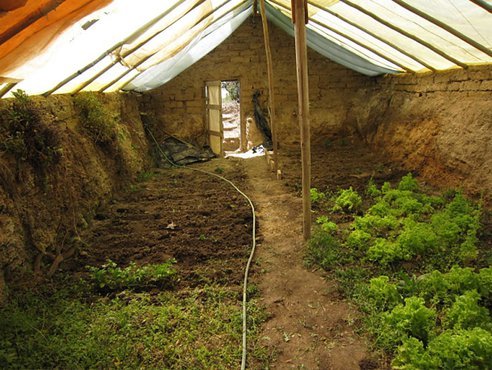
Build a $300 underground greenhouse for year-round gardening
Growers in colder climates often utilize various approaches to extend the growing season or to give their crops a boost, whether it’s coldframes, hoop houses or greenhouses.
Greenhouses are usually glazed structures, but are typically expensive to construct and heat throughout the winter. A much more affordable and effective alternative to glass greenhouses is the walipini (an Aymara Indian word for a “place of warmth”), also known as an underground or pit greenhouse. First developed over 20 years ago for the cold mountainous regions of South America, this method allows growers to maintain a productive garden year-round, even in the coldest of climates.[…]
hey!! sorry to hijack this post, but there are a bunch of ways you can make videogames without knowing shit about computers!!
for starters, there’s Twine, which is fucking great for making all kinds of interactive experiences (it’s what Crystal Warrior Ke$ha was made in so you KNOW it’s good) at all skill levels (i picked it up and made a game in two minutes a few nights ago)
if you want a bit more involved experience there’s Inform 7 which is a simple language for text-based adventure games that reads like slightly-weird English and also relatively easy to learn
you can do some pretty fucking cool stuff with Unity (my personal engine of choice) but you may need to dig a bit farther to get at the good stuff. there’s lots of really good presets though (i made an entire game just mixing and matching pre-existing templates and adding in my own art, won an award at a game jam for that one) and if you want help the community’s pretty dang friendly from what i’ve seen!
this is just a taste of what’s out there from what i’ve seen, but there’s so many cool resources out there. if anyone wants help getting started, i’m around to give you a leg up on making something in the coolest, most unexplored art medium around!
I’m addin’ to this post because lowering the barrier to entry for making games is super important to me!!!! If y’all have any questions about making games, you’re welcome to come and ask! I made this list a while back with some friends, so it has some of the programs John already mentioned.
2D Editors:
GameMaker : Potential for pure drag-and-drop “programming”. It is recommended to read-up on the program’s functions to make good use of it. Good for prototyping. Uses its own language called Game Maker Language (GML) that is similar to a C language (e.g. C++ or C#). For both Mac and PC; free version available.
Construct2 : Drag and drop level editor that uses an “If-Then” event sheet structure for programming. Good for prototyping and for beginners. For PC; free version available.
GameSalad : Drag and drop with no code requirement. Good for programming. For both Mac and PC; free version available.
Solpeo : HTML5 based game engine for 2D and isometric game development. Some programming knowledge needed. Platforms supported: Chrome, Firefox, Internet Explorer 9+. Free version available.
Stencyl : Drag and Drop “programming,” templates you can edit the variables/values for.
Scratch : Lego-block-style coding platform by MIT; totally free and a great intro to thinking in code. Very kid-friendly and comes with a community site. Browser version available.
3D Editors:
Unity : 3D editor that creates 3D games. Can build games for browser, as an app, or for mobile devices (iOS and Android). For both Mac and PC; free version available.
UDK (Unreal Development Kit) : Full-fledged, highly advanced editor. Features a complete set of tools that go from level design to visual scripting to cut-scene creation. Uses it’s own programming language called Unreal Script that can be arranged with Kismet, a visual code editor. For Mac and PC; free.
2D Art/Animation Software:
GIMP : Free photo editing and digital painting software.
Easy Paint Tool SAI : Free digital painting software with a UI similar to Photoshop.
Mischief : Free digital painting software with an endless canvas.
3D Art/Animation Software:
Sculptris : From the company that created Zbrush, this free software is ideal for beginning 3D sculptors.
Maya : Animation, VFX, lighting, and rendering software.
Magical Voxel : Voxel Art (3D Pixel Art). Very intuitive and quick to pick up.
SketchUp : Architectural modeling software, great for creating 3D environments and buildings. Free version available.
Text-Based Games:
Twine : Create interactive text stories using Twine’s visual map system that links your game together. Easy to learn and use. End result is browser-based. For Mac and PC; free.
Quest : Interactive text stories that you can build in-browser.
Ren’Py : Create visual novels using a modified version of Python that reads like a combination of stage directions and a CYOA novel. For PC, Mac, and Linux; free.
Audio Resources/Editors:
Indie Game Music : This site offers free indie music with no need to worry about royalties or licenses.
Audacity : A free, open-source, cross-platform sound editor that allows you to record and arrange sound.
Super Flash Bros. : This site allows you to record theremin-like (8bit) sounds and export them as .wav files for your games.
hello! I recently found this rad app called “CamScanner”, a mobile app for android and iOS
what does this app do? well, basically it imitates a scanner, so even if you don’t have one, you can take real cool pictures of your drawings!
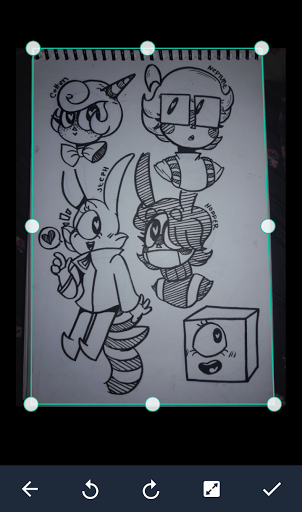
for this to work, i suggest you take a picture of your entire paper / sketchbook / etc. The app will automatically crop your picture and come out with something like this:
(sometimes it wont be too accurate, but that can be easily fixed by moving the frame yourself)
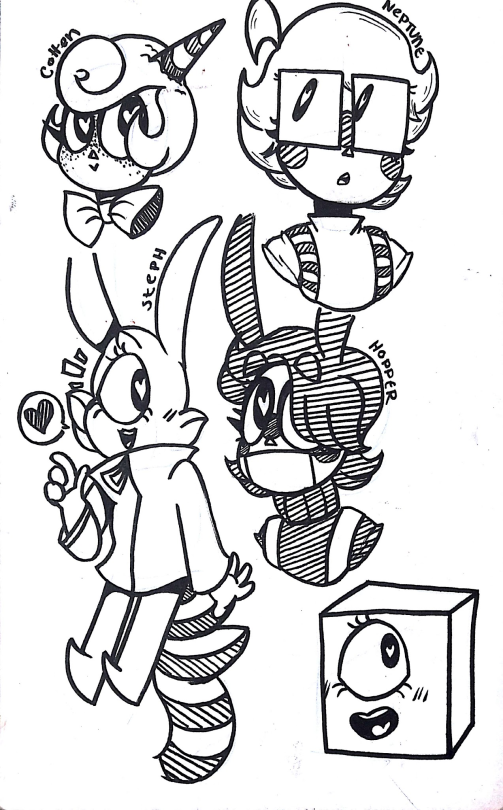
once scanned, the app will make it so your drawing looks like this:
(the app will have some presets, so you might want to mess around with those. OR you can mess with the settings yourself to get a look you desire)
this can be really helpful if you plan to color your traditional piece on a computer, or something similar.
this can even work with colored drawing, if you’d like!
original:
edited with CamScanner:
if you mess with the settings yourself, i bet you could get the picture to look better, as i did this with the presets.
i think crunchyroll’s license on the series expired a couple months ago, so unfortunately i’m pretty sure the only option for watching flip flappers is to pirate it or buy the blu-rays. i do not currently have the link to the blu-rays, but i’m sure you could find it if you dug through either the flip flappers tag or google
currently i use 9anime for my pirating needs because i dun like kissanime. there’s a lot of pop-up ads on 9anime if you’re using adblock but after i found out that adblock lets ads through bc they’re SELLOUTS i switched to this extension called ublock origin and honestly i forgot that 9anime even used to have pop-up ads. (anyway nonsponsored promo aside)
so i should preface first that its BEST to do this with a song you have the full stems of (the instruments/vocals/sfx seperated into different tracks; there are several sites where you can download these!), as just doing this with a song itself will give pretty iffy results. you also need FL Studio (it has a free demo with these features available btw) to do this!! also also, if these pictures are fucked up by tumblr’s terrible image quality i’ll include an imgur album of these at the bottom to look through instead.
on to the tutorial!
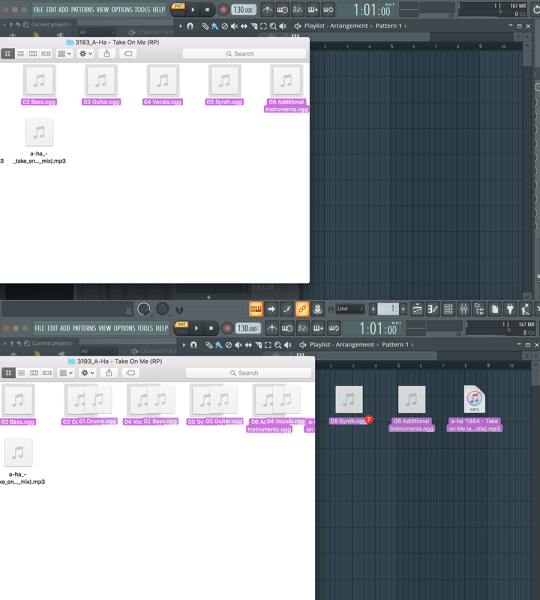
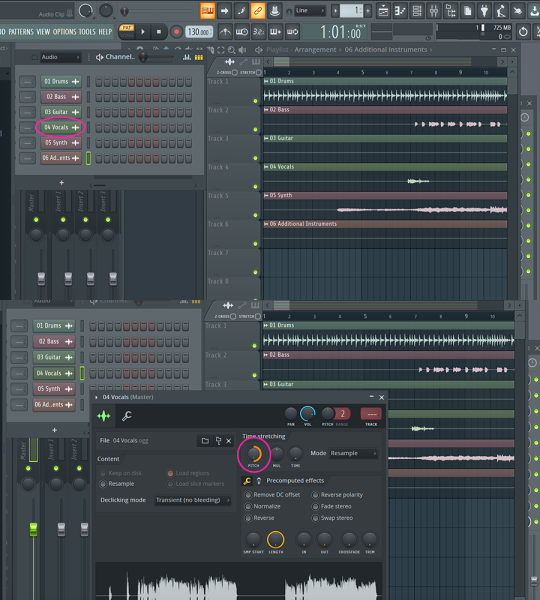
first of course, drag your files into FL Studio
click on your VOCAL TRACK in the Channel Rack and pitch shift the vocals as high as you can
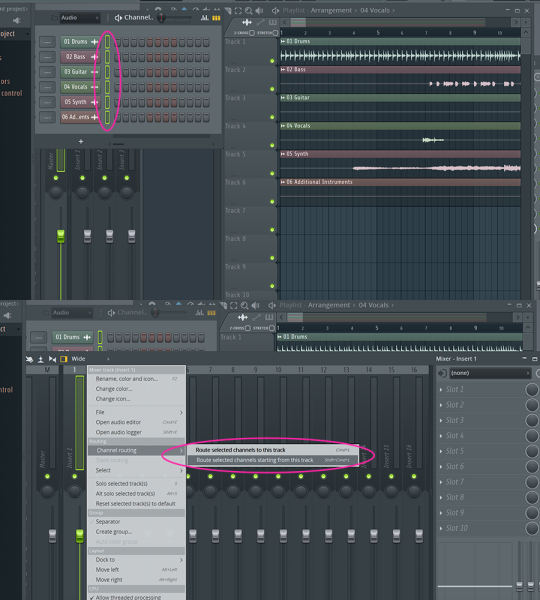
now shift + click the circled area in the Channel Rack to select all your tracks. now go to your Mixer, right-click the first channel and select the circled option.
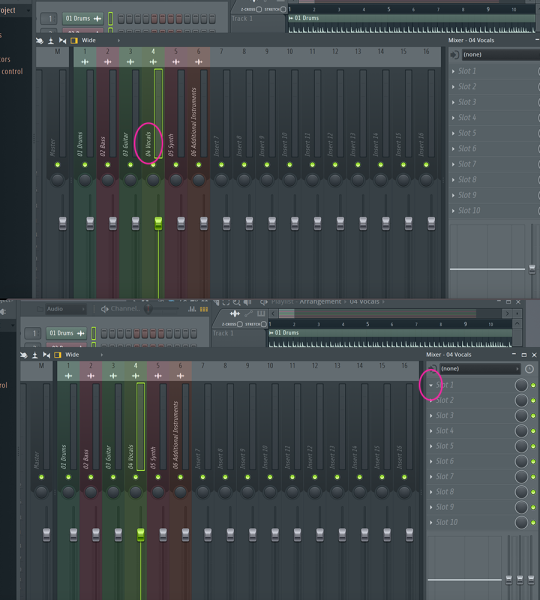
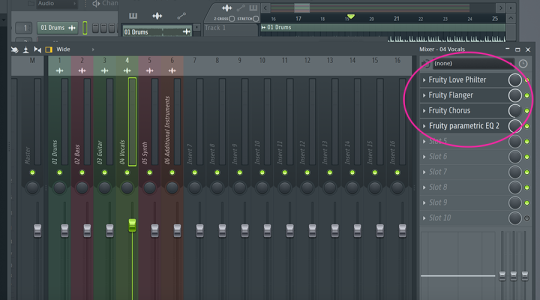
now click the channel with your vocals, then click on “Slot 1″ to the right
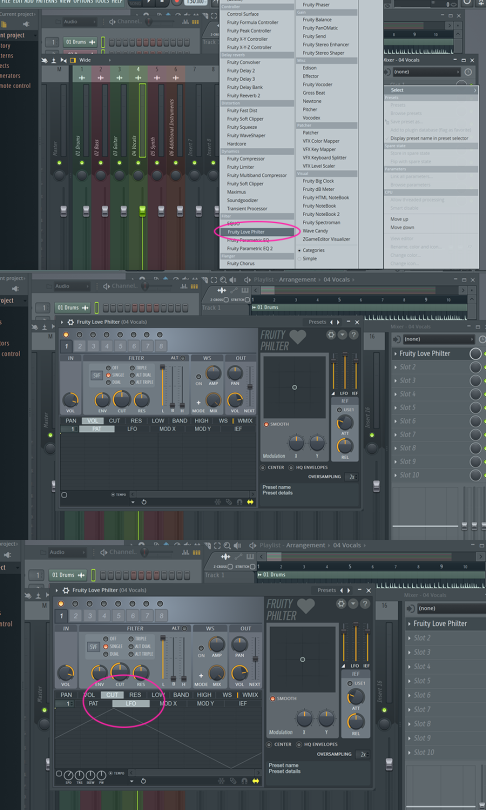
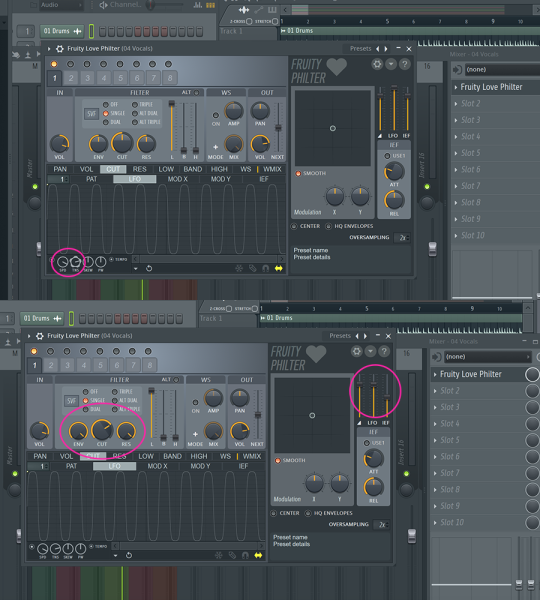
select the Fruity Love Philter option, and the following window will come up. what you want now is to click on “CUT” then “LFO”
you’ll want to adjust these circled nobs and to get close to what I have, BUT THIS WILL BE DIFFERENT FOR EVERY SONG YOU EDIT! it all depends on what you’re editing!
on that note, the bulk of the remainder here is all experimentation! even messing with the Fruity Love Filter is gonna be a lot of trial and error + messing around with the options.
I typically use these filters and mess around with them to get a decent result!!
NOW GO FORTH AND MAKE MEMES (imgur link alternative here)
 sky's stuff